
Latex testing
Here we test different ways of adding equations to Bookstack pages.
Draw.io integration
This is an equation added using draw.io integration:
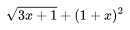
To do this, add an image using the WYSIWYG editor. Then, once in draw.io, enable mathematical typesetting under the Extras menu. Type some LaTeX code in a text box, resize accordingly and then save. This is presumably best for pages with few equations.
Using MathJax directly
This is an equation that is written in $\LaTeX$ directly in the Markdown source code and then rendered using KaTeX:
\[ \sqrt{3x+1} + (1+x)^2 \]
To do this, add the following scripts to the custom header in Bookstack, courtesy of eceforge@github.
<link
  rel="stylesheet"
  href="https://cdn.jsdelivr.net/npm/katex@0.11.1/dist/katex.min.css"
  integrity="sha384-zB1R0rpPzHqg7Kpt0Aljp8JPLqbXI3bhnPWROx27a9N0Ll6ZP/+DiW/UqRcLbRjq"
  crossorigin="anonymous"
>

<script
  defer
  src="https://cdn.jsdelivr.net/npm/katex@0.11.1/dist/katex.min.js"
  integrity="sha384-y23I5Q6l+B6vatafAwxRu/0oK/79VlbSz7Q9aiSZUvyWYIYsd+qj+o24G5ZU2zJz"
  crossorigin="anonymous"
></script>

<script
  defer
  src="https://cdn.jsdelivr.net/npm/katex@0.11.1/dist/contrib/auto-render.min.js"
  integrity="sha384-kWPLUVMOks5AQFrykwIup5lo0m3iMkkHrD0uJ4H5cjeGihAutqP0yW0J6dpFiVkI"
  crossorigin="anonymous"
></script>

<script>
  var katexRenderFilter = function katexRenderFilter () {
    var content = document.body.getElementsByClassName("page-content");
    if (content.length > 0) {
      renderMathInElement(content[0], {
        delimiters: [
          {left: "$$", right: "$$", display: true},
          {left: "$", right: "$", display: false},
          {left: "\(", right: "\)", display: false},
          {left: "\[", right: "\]", display: true}
        ]
      });
    }
  }
  document.addEventListener("DOMContentLoaded", katexRenderFilter);
</script>