
Latex testing
Here we test different ways of adding equations to Bookstack pages.
Draw.io integration
This is an equation added using draw.io integration:
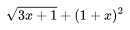
To do this, add an image using the WYSIWYG editor. Then, once in draw.io, enable mathematical typesetting under the Extras menu. Type some LaTeX code in a text box, resize accordingly and then save. This is presumably best for pages with few equations.
Using MathJax directly
This is an equation that is written in $\(\LaTeX\)LaTeX$ directly in the Markdown source code and then rendered using MathJax:
\[ hi \]