
Latex testing
Here we test different ways of adding equations to Bookstack pages.
Draw.io integration
This is an equation added using draw.io integration:
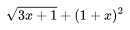
To do this, add an image using the WYSIWYG editor. Then, once in draw.io, enable mathematical typesetting under the Extras menu. Type some LaTeX code in a text box, resize accordingly and then save. This is presumably best for pages with few equations.
Using MathJax directly
This is an equation that is written in \(\LaTeX\) directly in the Markdown source code and then rendered using MathJax:
\[ hi \]